
Rupeeflo in the news

Our GIFT City and payments play, featured in BusinessLine.->

Rupeeflo in the news

Our GIFT City and payments play, featured in BusinessLine.->

Rupeeflo in the news

Our GIFT City and payments play, featured in BusinessLine. →

Products

Company

For Institutions

For Collaboration

Resources

Download App

Resources

Tools

Blogs

FAQs

About Us

Resources

For Institutions

For Collaboration

Products

NRI Demat Account

Digital Notarization

Document Courier

Money Transfer

Download App

Taxation

Published on

Nov 26, 2025

5 mins

How to Reactivate Your PAN Card: A Step-by-Step Guide

Neha Navaneeth

Marketing & Content Associate

Share Blog:

For NRIs, a PAN is essential for nearly every India-linked financial activity like investing in mutual funds, opening NRE/NRO accounts, buying property, filing taxes, and more. But many NRIs discover, often at the worst time, that their PAN has been marked inoperative or even deactivated.

Here is everything you need to know about reactivating your PAN. 

What is a PAN and why can it be deactivated?

A PAN is a unique identifier issued by the Indian Income Tax Department. Most NRI PAN deactivations happen due to one of these reasons:

1. PAN- Aadhaar Not Linked

Under Indian tax rules, PAN must be linked with Aadhaar. 

But NRIs are exempt from mandatory linking; provided your PAN database correctly reflects your NRI status.
If your status wasn’t updated, the system may treat you like a resident and deactivate your PAN for not completing Aadhaar linking.

Note: This is the most common reason for NRI deactivation.

2. Duplicate or Multiple PANs

If the system identifies two PANs issued to the same person, one may be deactivated.
This affects some older PANs or cases where NRIs applied again after moving abroad.

How to Check if Your PAN Is Inoperative

You can verify your PAN status on the Income Tax portal. Follow the steps below: 

Step 1 : Visit https://www.incometax.gov.in

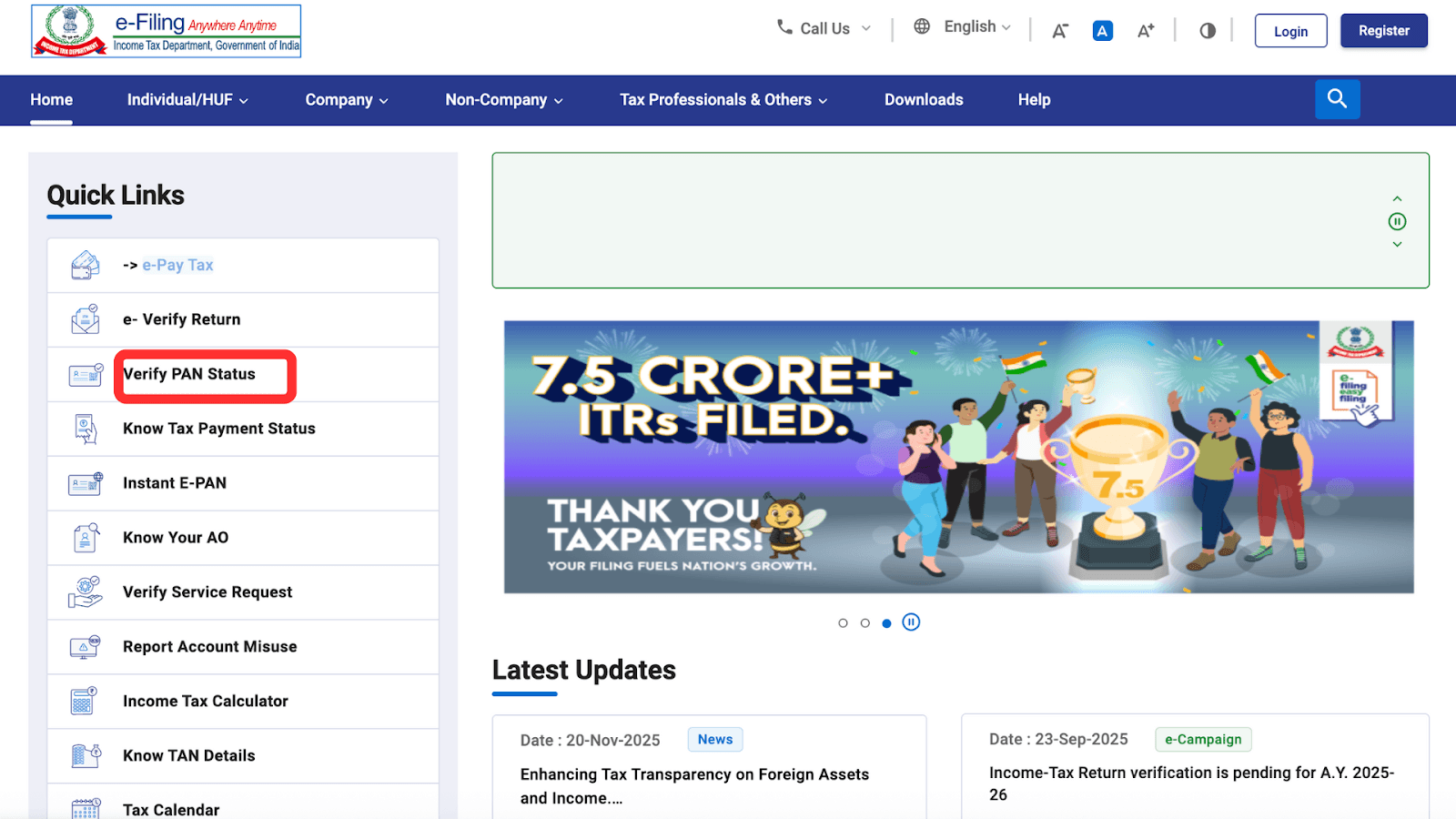
Step 2 : Find “Verify your PAN” under Quick links on the left side of the page. 
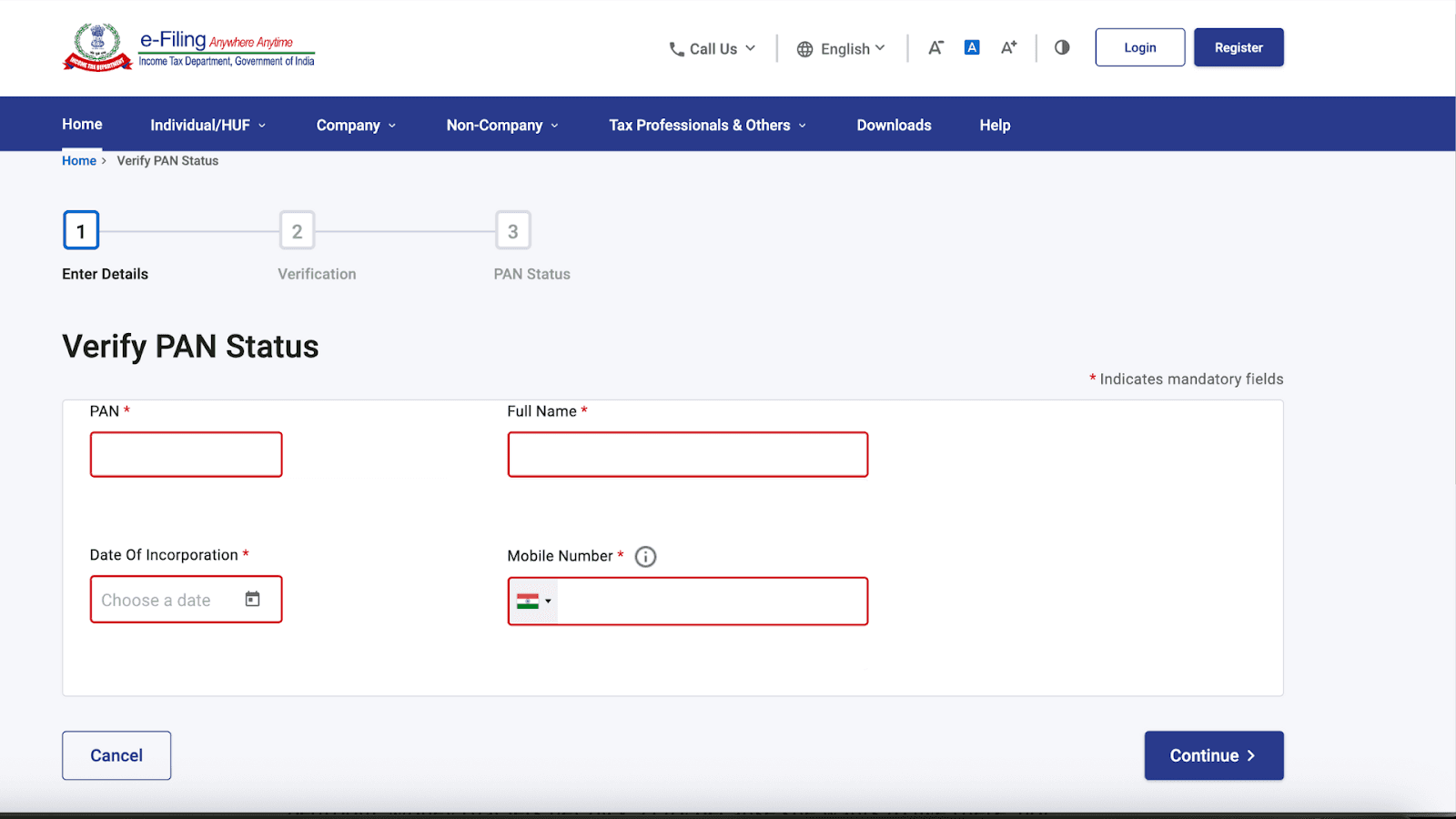
Step 3: Enter your basic details 

  • PAN Number

  • Full Name (as per PAN records)

  • Date of Birth

  • Mobile Number


Enter the information exactly as it is on your PAN card.

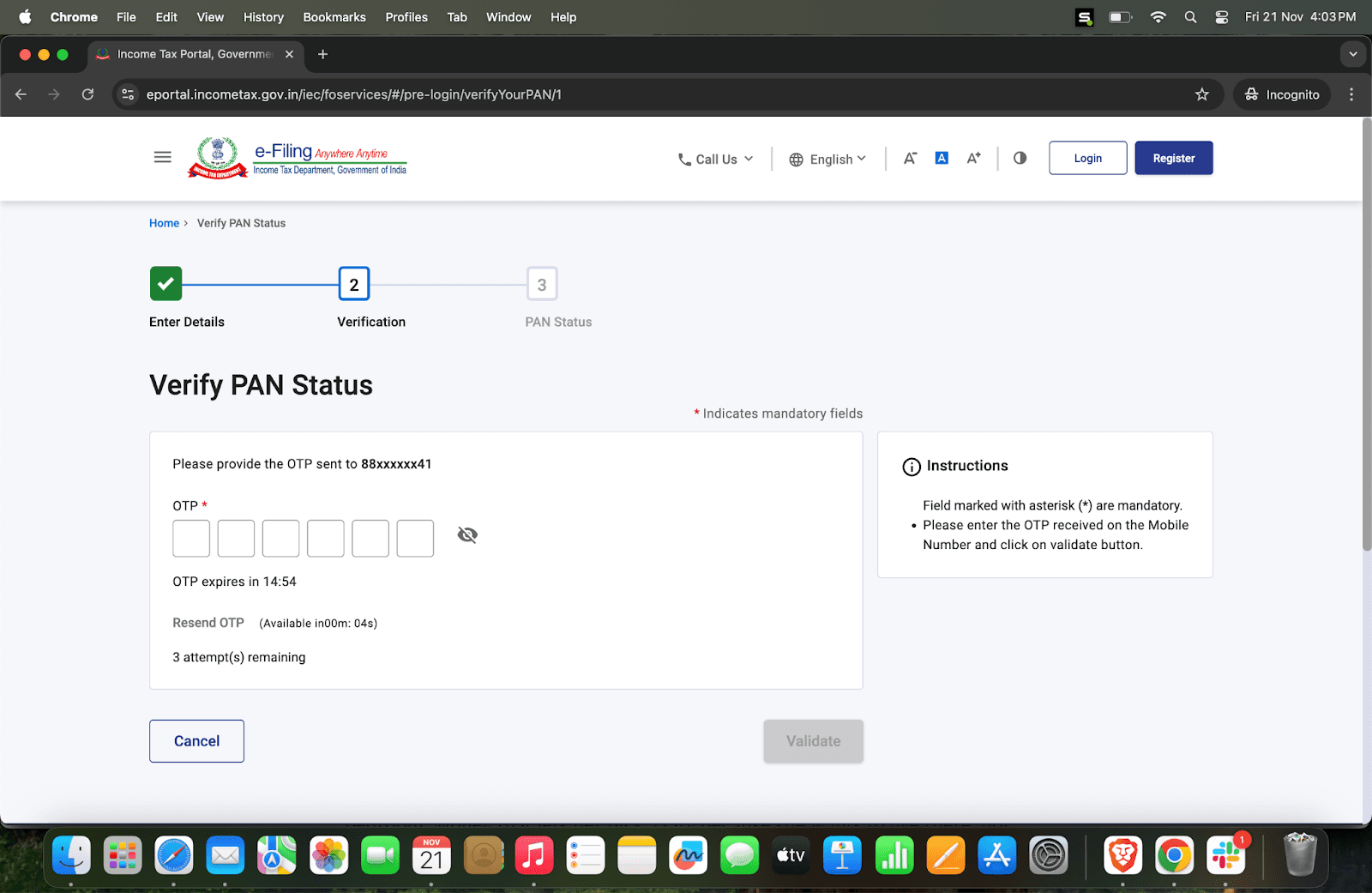
Step 4: Complete OTP Verification

  • An OTP will be sent to the mobile number you entered.

  • Enter the OTP and proceed.

Note for NRIs:
If you used an Indian mobile number originally for PAN and you are abroad now, ensure it is still active. Otherwise, use someone in India to help complete this check.

If it shows “Inoperative due to non-linking with Aadhaar” or “Deactivated,” follow the steps below.

How NRIs Can Reactivate Their PAN

The reactivation process depends on why it was deactivated.

Case A: PAN Was Deactivated Because Aadhaar Was Not Linked (Most Common for NRIs)

Before you begin, please know NRIs do not need to link Aadhaar to PAN.
The only reason the system demands linkage is because your PAN is incorrectly marked as “resident.”

Step 1: Update Your Residential Status With the Income Tax Department

You need to inform the IT Department that you are an NRI. This is done by submitting a request to your Jurisdictional Assessing Officer (AO).

Your request must include:

  • A signed letter stating you are an NRI and requesting PAN reactivation

  • Copy of your deactivated PAN card

  • Proof of NRI status, such as:

    • Passport showing immigration stamps

    • OCI/PIO card

    • Overseas address proof

    • Foreign resident visa/work permit

  • If required by AO:

    • Foreign bank statement

    • Any document showing overseas stay/residency

Where to send:
AO details are available in the PAN Services AO directory or IT portal. Follow the steps below to find the details of your jurisdictional assessing officer.
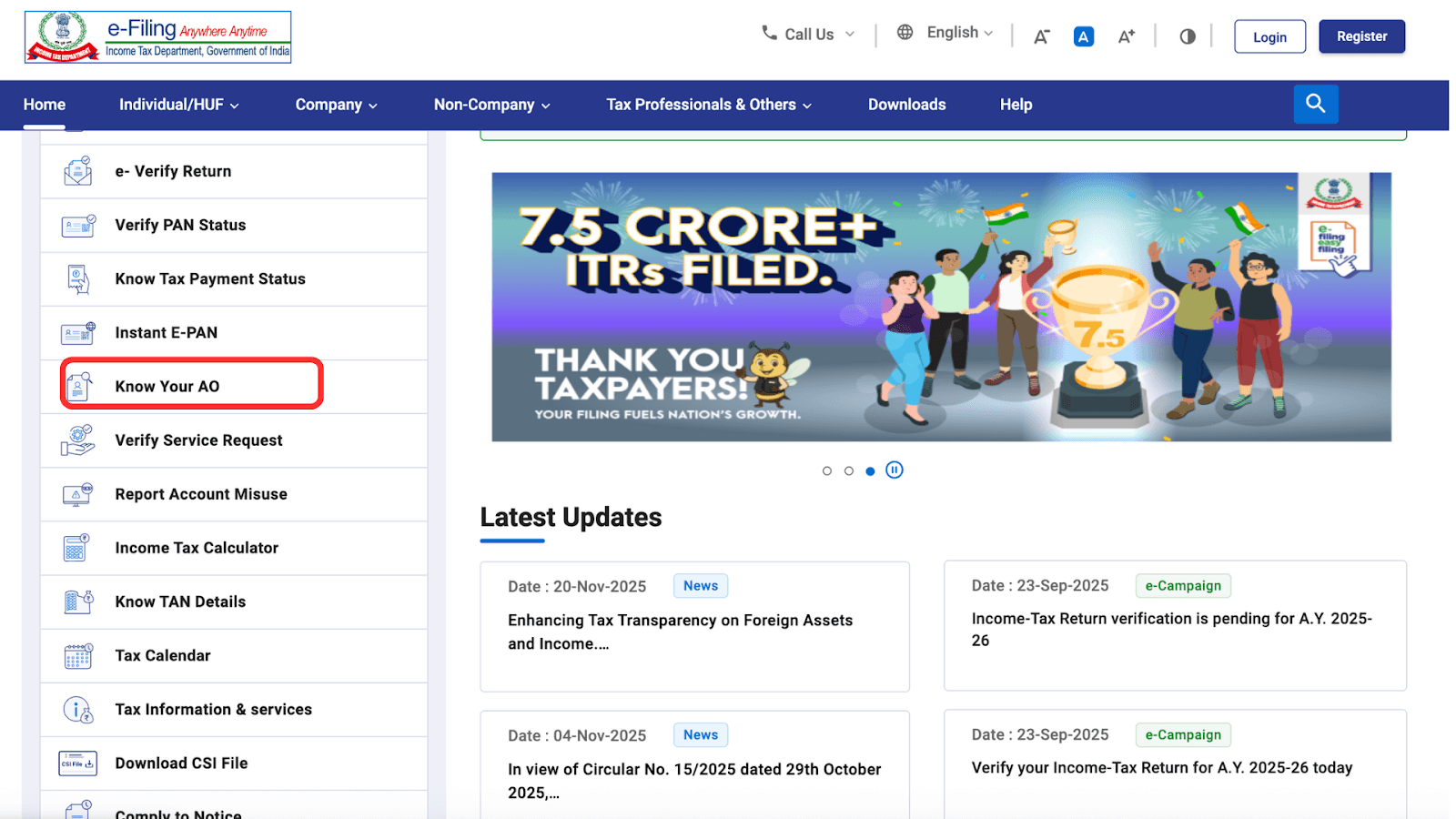
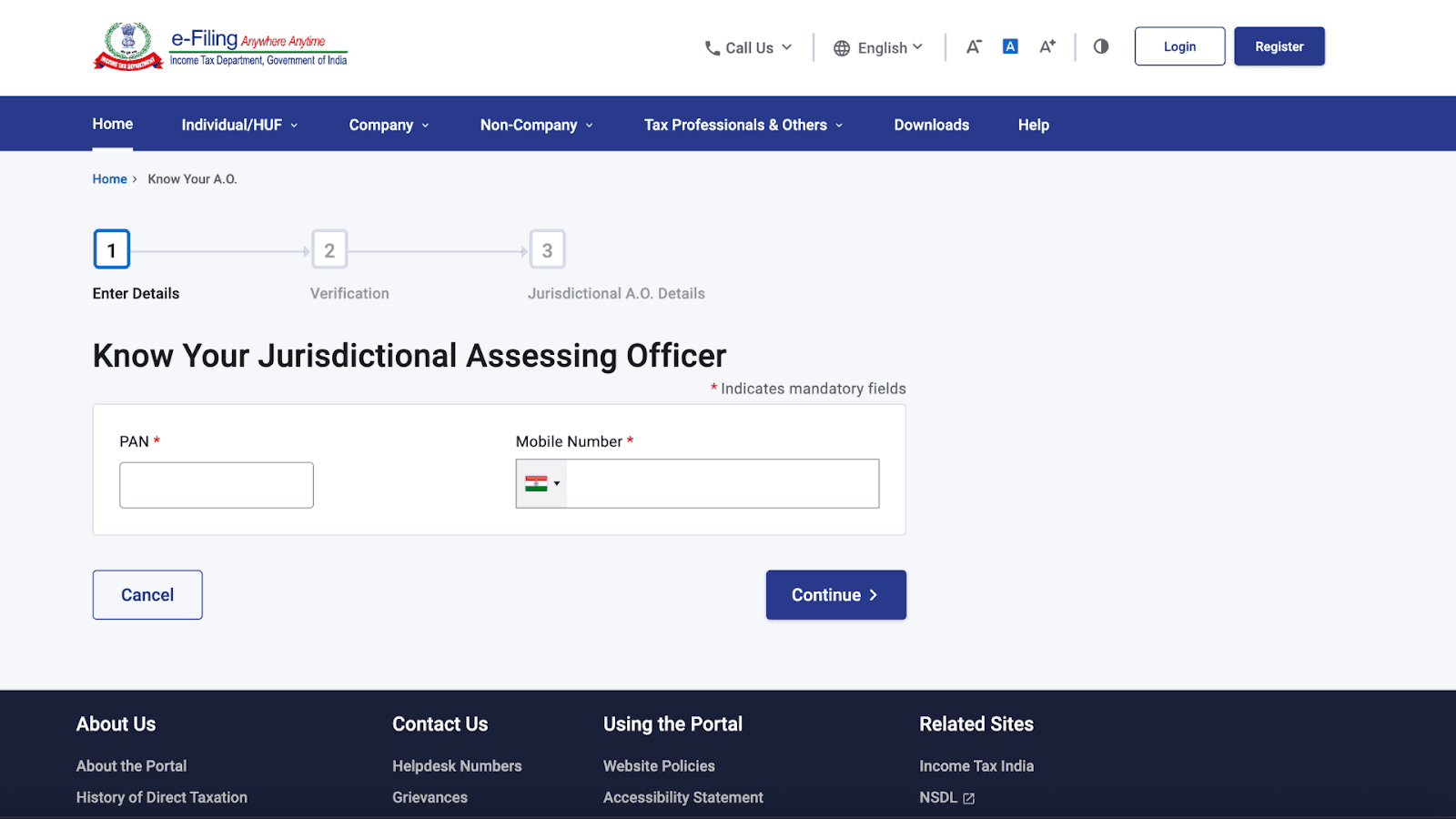
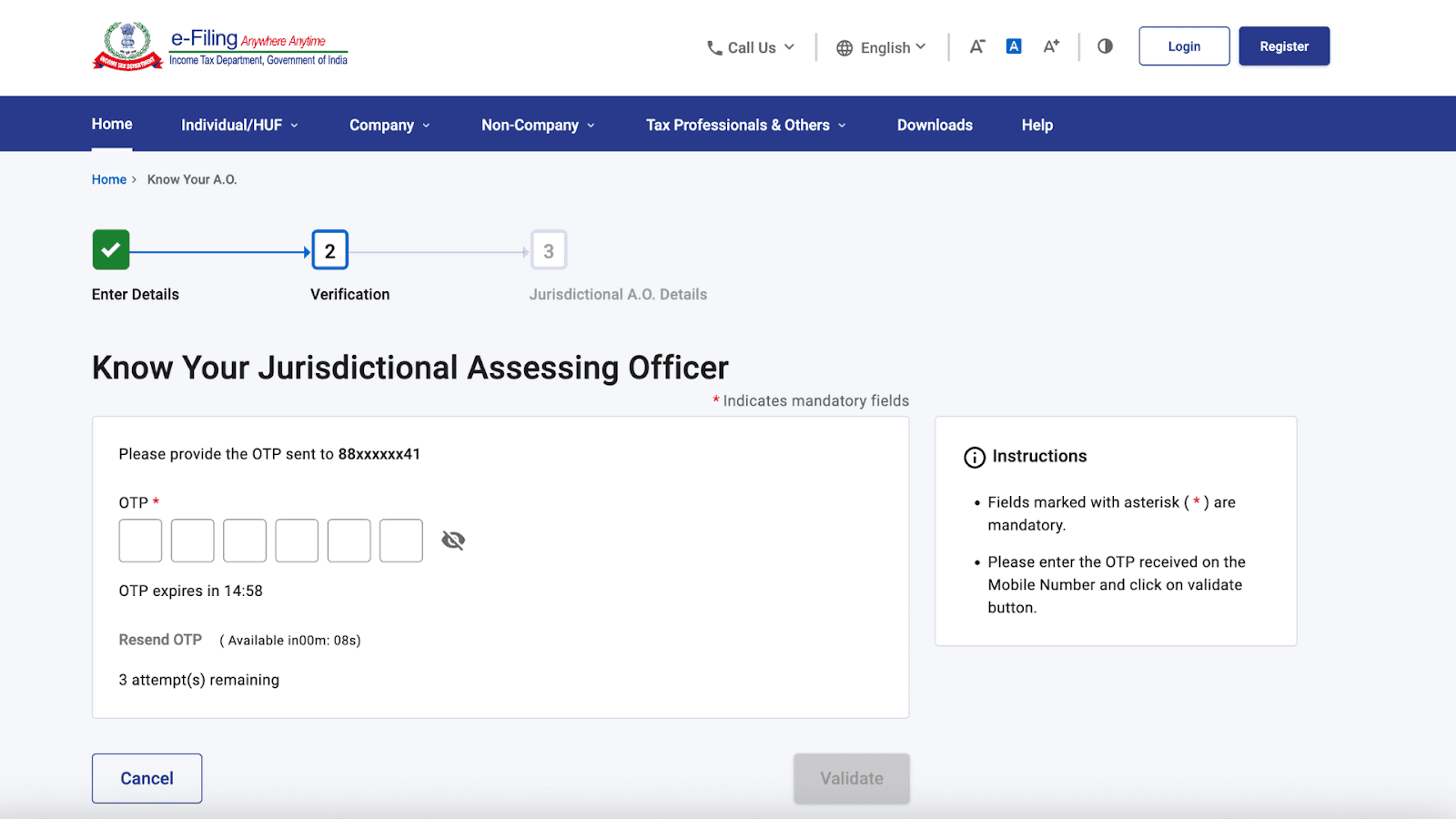
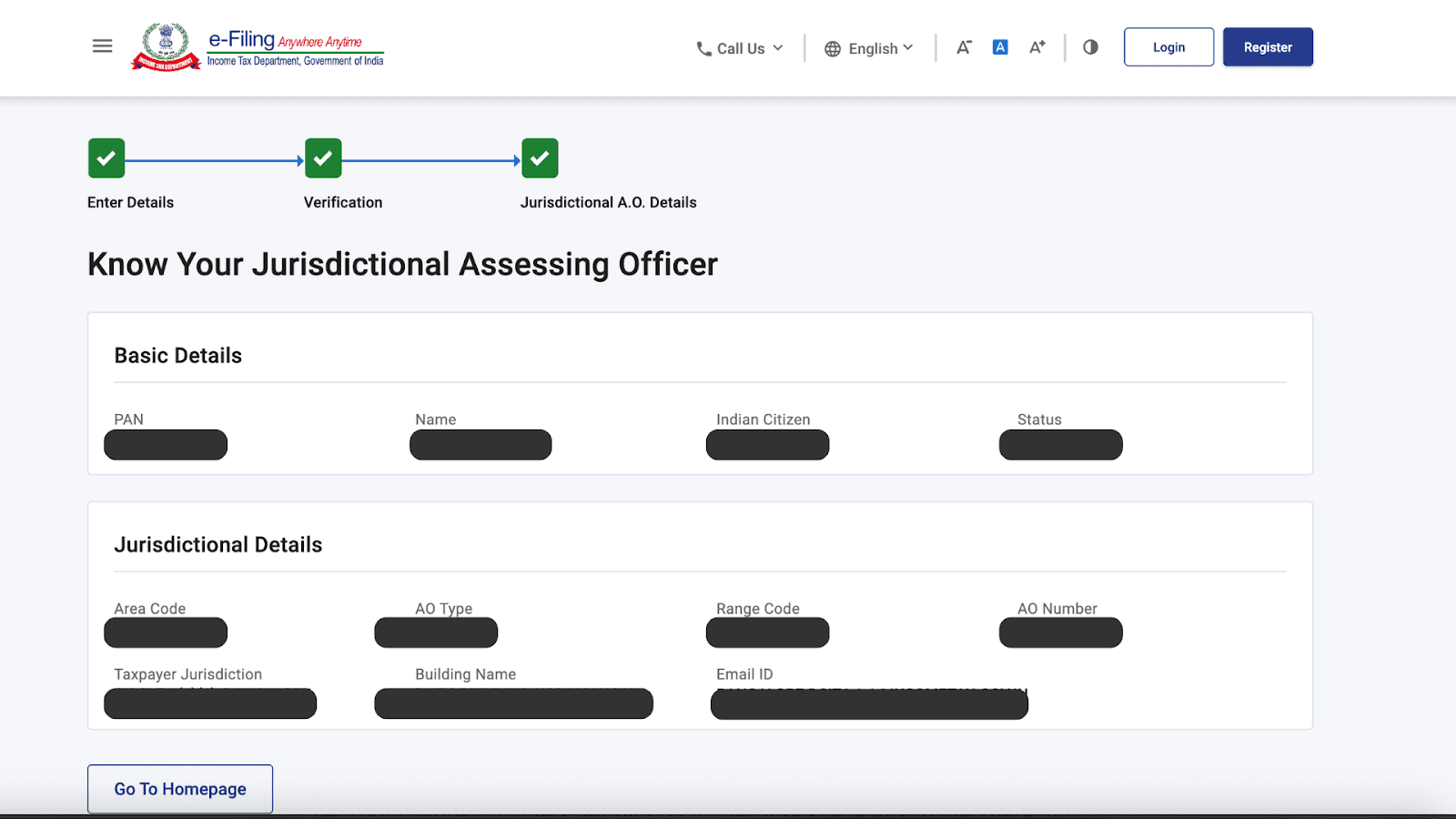
Step 2: AO Updates your status to NRI

Once the AO updates the status in the PAN database, your PAN will no longer require Aadhaar linking.

Step 3: PAN Becomes Active Again

After the residential status is corrected, your PAN automatically becomes active.
Timeline: Usually 7–15 working days

Case B: PAN Deactivated Due to Duplicate PAN

If the IT system believes you hold more than one PAN, you must complete a small compliance process.

Step 1: Write a Reactivation Request to Your AO

The letter must include:

  • Your correct PAN

  • Reason for reactivation

  • Declaration that you will surrender the duplicate PAN (if any)

Step 2: Attach Required Documents

Typically:

  • Copy of the deactivated PAN

  • Indemnity Bond confirming you do not hold multiple PANs

  • Copies of last 3 years’ ITR filed (if applicable)

Step 3: AO Reactivates the Correct PAN

After reviewing your documents, the AO will reactivate the valid PAN and instruct you to surrender any duplicate PAN numbers.

Timeline: 10-20 days.

Similar Blogs

Similar Blogs

View All Blogs

Taxation

Oct 30, 2026

How to Make a Power of Attorney in Dubai for India (2026)

Read Full Blog

Taxation

Oct 30, 2026

How to Make a Power of Attorney in Dubai for India (2026)

Taxation

Oct 28, 2026

UAE Tax Residency Certificate for Indians: How to Get It and Use It in India (2026)

Read Full Blog

Taxation

Oct 28, 2026

UAE Tax Residency Certificate for Indians: How to Get It and Use It in India (2026)

Taxation

Oct 28, 2026

India-UAE DTAA: Tax Rules for NRIs in the UAE (2026)

Read Full Blog

Taxation

Oct 28, 2026

India-UAE DTAA: Tax Rules for NRIs in the UAE (2026)

Taxation

Oct 30, 2026

How to Make a Power of Attorney in Dubai for India (2026)

Read Full Blog

Taxation

Oct 28, 2026

UAE Tax Residency Certificate for Indians: How to Get It and Use It in India (2026)

Read Full Blog

Taxation

Oct 28, 2026

India-UAE DTAA: Tax Rules for NRIs in the UAE (2026)

Read Full Blog

Taxation

Oct 23, 2026

NRI TDS Refund 2026: Claim Back Excess TDS on NRO Interest and Property

Read Full Blog

Everything NRIs need,
from anywhere.

Demat. Digital notarization. Document courier. Money transfers. All done from the comfort of your couch.

Subscribe to our newsletter

Products

NRI DEMAT Account

Digital Notarization

Document Courier

Money Transfer

Company

About Us

Careers

Contact Us

Resources

Resources

Calculators

FAQs

Legal

Privacy Policy

Terms of Service

Rupeeflo platform is owned and operated by DMA Rupeeflo Technologies Private Limited, which facilitates digitised and seamless process for opening of DEMAT & Trading accounts with various SEBI registered stockbrokers in India. The ultimate approval and activation of DEMAT & Trading accounts, are at stockbroker’s sole discretion; and upon opening of account, your relationship is exclusively governed by the respective stockbroker’s terms and conditions. Globalnest Securities Private Limited, a subsidiary of DMA Rupeeflo Technologies Private Limited is a NSE registered Authorised Person (AP) - AP2516005033 of Zerodha Broking Limited, a SEBI registered Stockbroker.

Privacy Policy

Terms of Service

Contact Us

© 2024–2026 Rupeeflo. All rights reserved.

Rupeeflo

Rupeefloooooooooooooooo

Rupeefloooooooooooooooo